What is Self-Hosting? Why You Should Build Your Own Server?

( first video of my channel )
What is Self-Hosting?
Self-hosting means running your own services instead of relying on third-party cloud providers. Whether it’s a personal website, file-sharing system, or even AI applications, self-hosting allows you to store and manage your data on a machine you control.
In contrast, services like Google Drive, ChatGPT, iCloud, or Dropbox store your data on company servers, where they may analyze or sell insights from it. With self-hosting, you keep everything private and secure within your own infrastructure.
Why Should You Consider Self-Hosting?
If you’re wondering why you should invest time and effort into self-hosting, here are four key reasons:
1. Privacy and Data Ownership
Most cloud services track and analyze your data. Self-hosting ensures full control, meaning no hidden data collection or tracking.
2. Security and Control
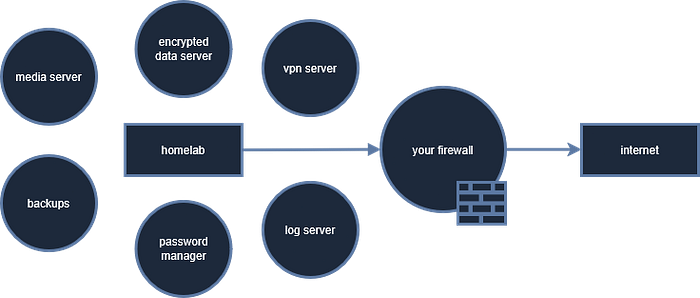
You decide how your data is stored and protected. With encryption, VPNs, firewalls, and other security measures, you can customize your setup to meet your personal security needs.
3. Cost Savings
While many cloud services offer free tiers, costs increase with additional storage and features. Self-hosting requires an initial investment but eliminates recurring fees. Many applications are open-source and free to use.
4. Performance and Customization
Cloud platforms limit your control over performance and customization. With self-hosting, you can optimize your setup, tweak settings, and automate processes for maximum efficiency.
What Can You Do With Self-Hosting?
One of the best aspects of self-hosting is its versatility. You can deploy various applications for different purposes, including:
- Personal Cloud Storage — Store and share files securely.
- Media Servers — Stream music and videos to your devices.
- Private Messaging Services — Secure chat applications.
- Password Managers — Store passwords safely.
- Home Automation — Control smart home devices.
- Self-Hosted AI Tools — Run AI-powered applications locally.
Do You Need Expensive Hardware?
Not at all! You can start with an old PC or a budget-friendly Raspberry Pi. These devices handle most self-hosting tasks efficiently.
What’s Next? Setting Up Your Self-Hosting System
In upcoming guides and videos, I’ll walk you through:
- Choosing the right hardware for self-hosting.
- Assembling your own PC server or other hardware
- Installing an operating system (Linux, Proxmox, or Windows).
- Setting up security and network configurations.
- Deploying useful applications for home use.
Is Self-Hosting for You?
Self-hosting requires some technical learning. Unlike traditional cloud services, you are responsible for updates, maintenance, and security. However, if you enjoy working with technology, value privacy, or want full control over your data, self-hosting is an excellent choice.
Join the Journey!
If you’re interested in learning more about self-hosting and building your own system from scratch, consider subscribing to my YouTube channel. That way, you’ll be notified when I release new videos and tutorials.
Let’s explore self-hosting together. See you in the next post!